AI Makes Design Decisions More Important
AI is making interface creation easier, but that doesn't make design less important. As execution becomes faster, I believe a designer's value increasingly shifts toward judgment: defining systems, making decisions visible, and creating the principles that guide what AI builds.
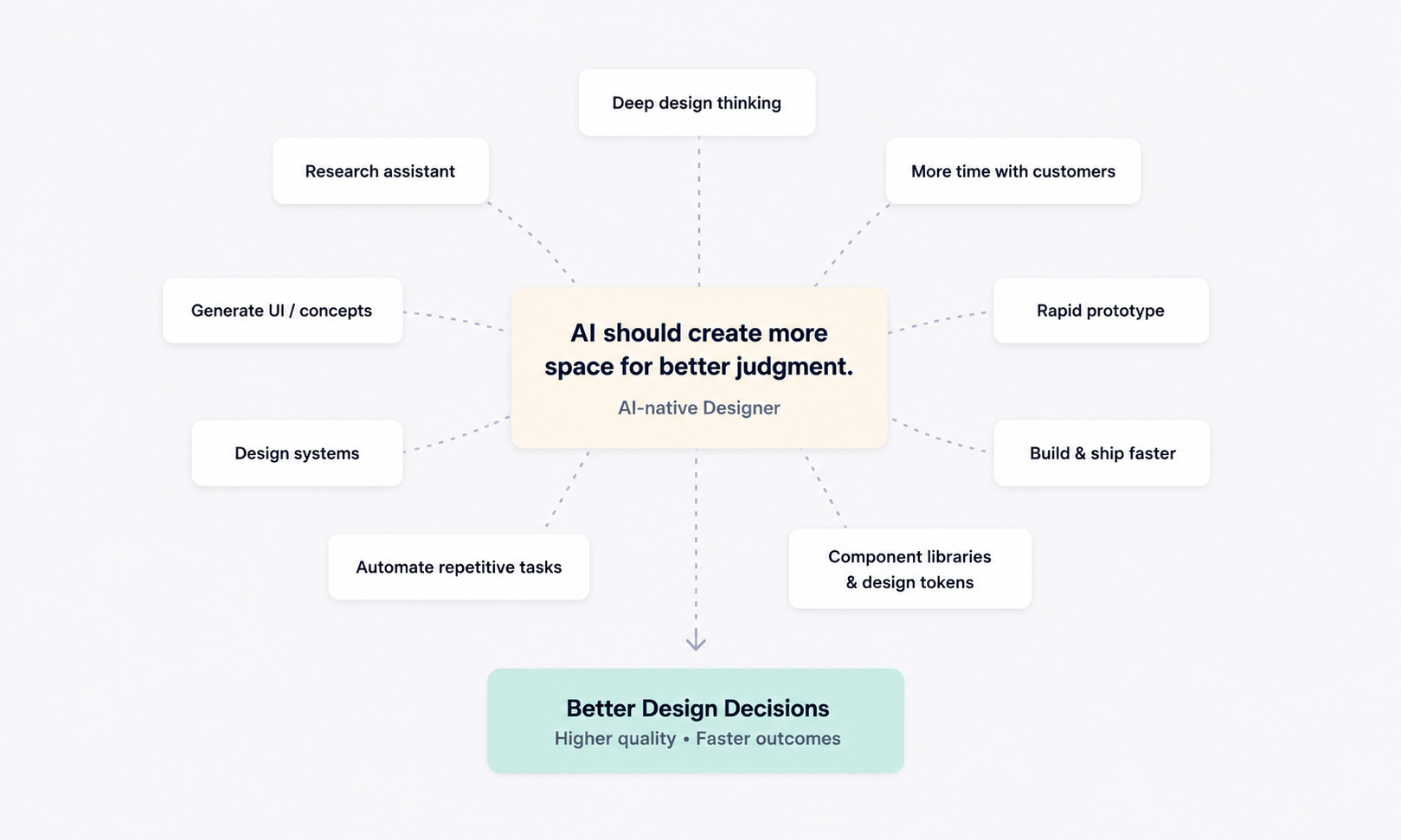
Intro
Over the past few weeks, I've been rebuilding my design workflow around AI tools such as Claude Code, Figma AI, and Cursor. Like many designers, I initially expected the biggest benefit to be speed. I assumed AI would simply help me produce interfaces faster.
Instead, I found something much more interesting: AI isn't changing the importance of design. It's changing where designers create value.
AI is changing how product teams collaborate
For many years, product development has followed a fairly familiar pattern:
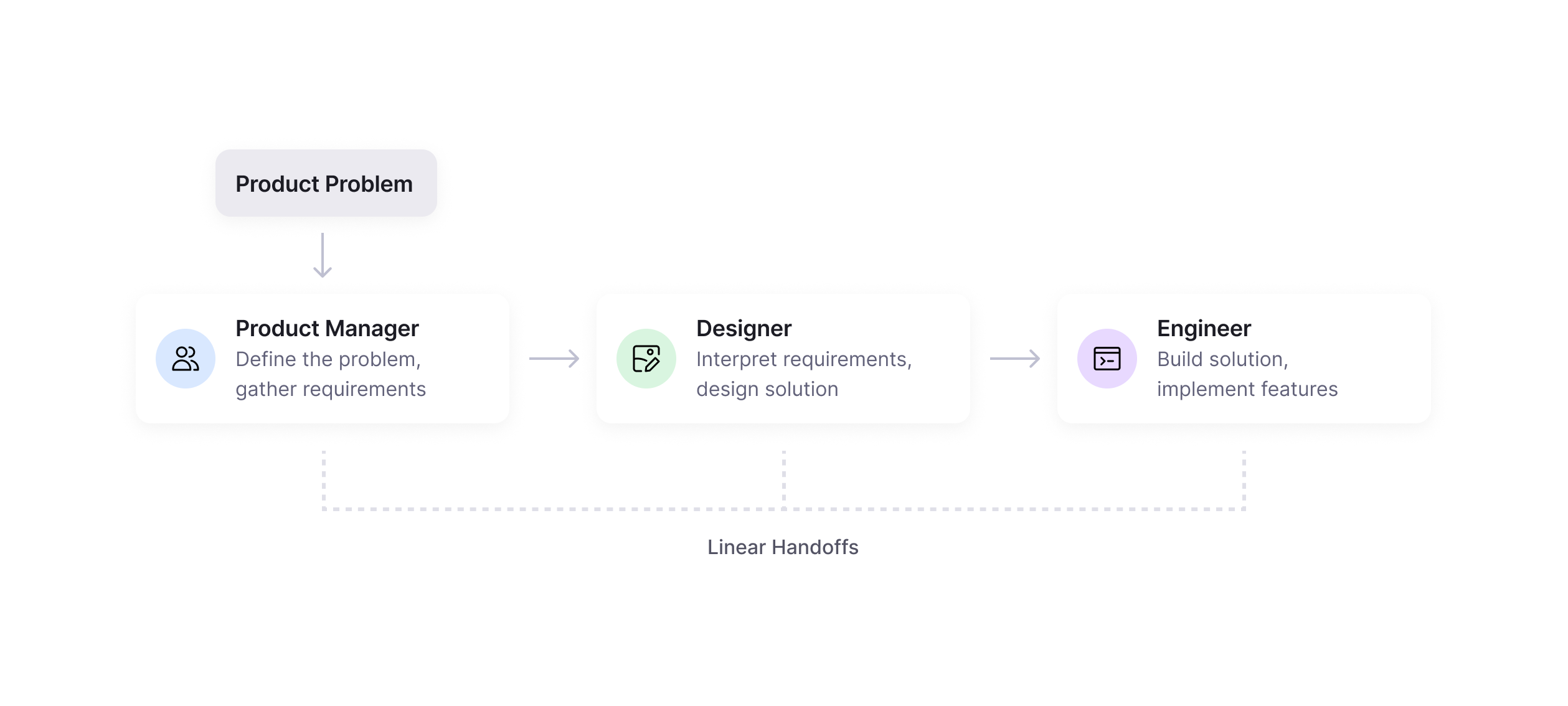
Although modern product teams collaborate much more closely than this simple diagram suggests, the core workflow has often remained fairly linear. Product requirements are defined, design follows, and implementation comes afterwards. Collaboration happens throughout, but the primary decision-making process generally moves in one direction.
As AI becomes part of everyday product development, I believe that model is beginning to evolve.
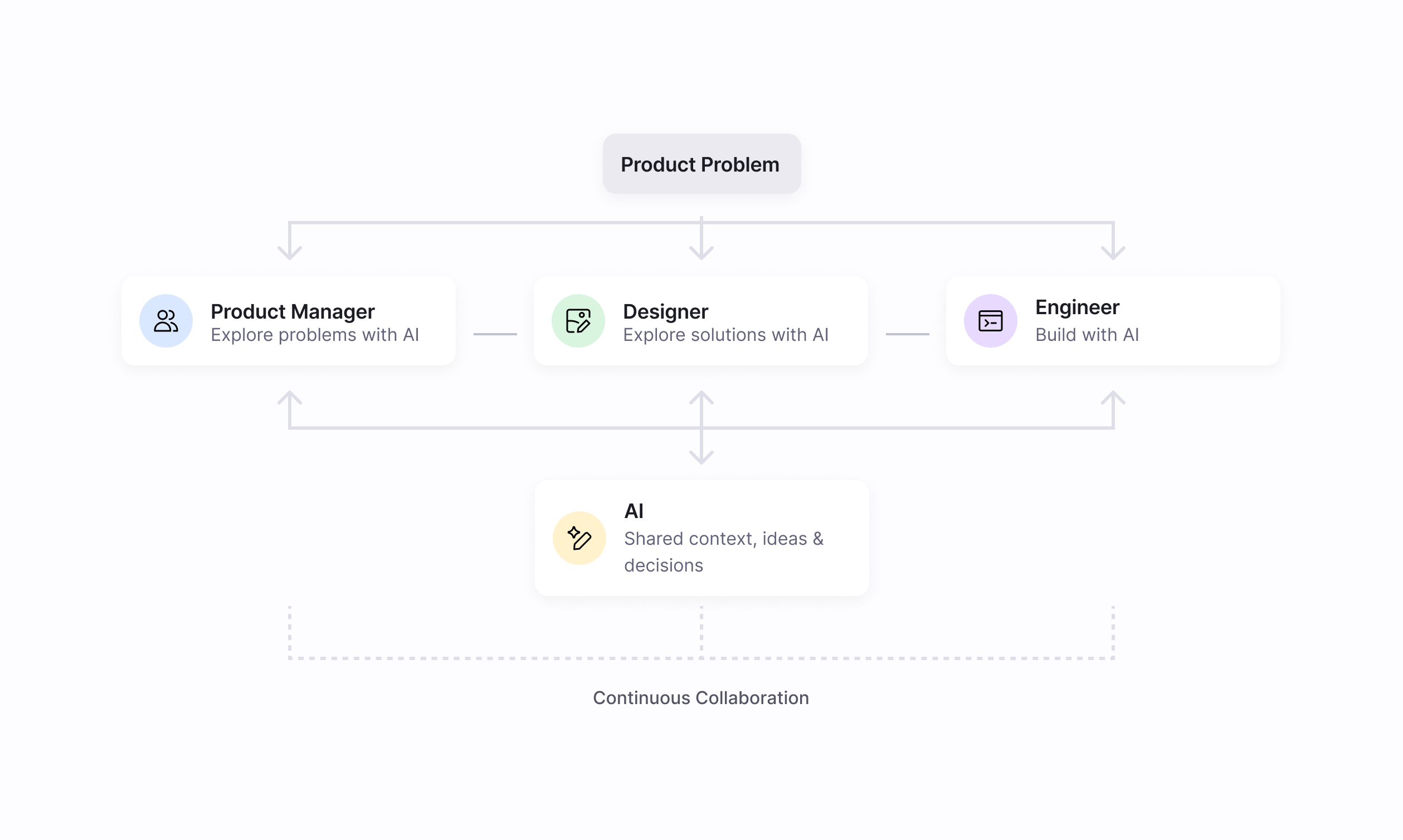
Rather than acting as another role on the team, AI is becoming a shared collaborator. Designers prototype with code. Engineers contribute to UX discussions much earlier. product managers can explore ideas before writing detailed specifications. The boundaries between disciplines become less rigid.
One of the biggest surprises for me has been how AI can create a shared language across the team. In many ways, AI can become the glue that connects Product, Design, and Engineering.
Teams have always wanted to collaborate closely, but maintaining shared context isn't easy. Ideas, decisions, and implementation details are often distributed across meetings, documents, chat messages, tickets, and individual files. Every handoff requires some amount of context to be reconstructed.
Working with tools like Claude Code feels different. The conversation can carry the original problem through design decisions, implementation discussions, and technical trade-offs. Previous decisions can be revisited, the reasoning behind them remains visible, and ideas can evolve without constantly rebuilding context.
Ironically, one of AI's biggest strengths may not be generating interfaces at all. It may be making collaboration and decision-making more transparent.
AI rewards better decision-making
The biggest shift I experienced wasn't learning new tools. It was learning to make better decisions.
Before AI became part of my workflow, a meaningful portion of my day could be spent producing deliverables: creating components, tweaking Auto Layout, maintaining design systems, duplicating screens for different workflow states, or adjusting spacing by a few pixels. These tasks are necessary, but they also consume time that could otherwise be spent understanding users and solving product problems.
When I began using Figma AI, I expected those tasks to become dramatically faster.
Surprisingly, they didn't always.
For a medium-sized task, like creating a component, doing the work manually versus carefully prompting Figma AI could take a similar amount of total time. The difference wasn't necessarily speed. The difference was how I spent that time.
Instead of manually producing repetitive work, I could hand some of that work to AI while shifting my attention elsewhere: reviewing research, talking with engineers, discussing feasibility with product managers, exploring alternative solutions, or simply thinking more deeply about the problem itself.
That shift feels far more significant than saving a few minutes.
The opportunity isn't necessarily to work faster. It's to spend more time on the work that actually requires human judgment.
AI encourages designers to think more clearly
One unexpected benefit of AI-native workflows is that they naturally encourage clearer thinking. Good prompts require clarity, and clarity requires decisions to be articulated.
Instead of vaguely describing what I wanted, I found myself becoming much more explicit: Why should this component behave this way? Which spacing token should it use? Should this color be semantic or primitive? What naming convention will still make sense six months from now?
Writing those decisions down did something I hadn't expected. It made every assumption visible, not only to the AI, but also to myself and to anyone else working on the project.
Instead of disappearing inside meetings or existing only in my head, design decisions became something the whole team could review, question, and improve together.
AI reinforced one of the oldest principles of good design practice: Make your thinking visible.
Design systems become even more valuable
One of the most interesting observations during this project came from experimenting with AI-generated interfaces.
Generating UI has become incredibly easy. Whether it's Claude, v0, Lovable, or other tools, almost anyone can now create an impressive-looking interface within minutes.
That changes something fundamental.
Design is no longer the bottleneck. Decision-making is.
Without a design system, AI-generated interfaces can quickly become inconsistent. Colors drift, spacing changes, components behave differently, and interactions lose coherence. It's not necessarily because AI lacks creativity. It's because AI can only work with the design principles and context it has been given.
That makes design systems more important than ever, not simply as documentation or a component library, but as a collection of design decisions.
A semantic design token(sometimes called a utility token) might seem like a small detail. Deciding that a color is always used for a background rather than text might seem trivial. But those decisions become incredibly valuable when AI or people, without deep knowledge of the design system, begin generating interfaces at scale.
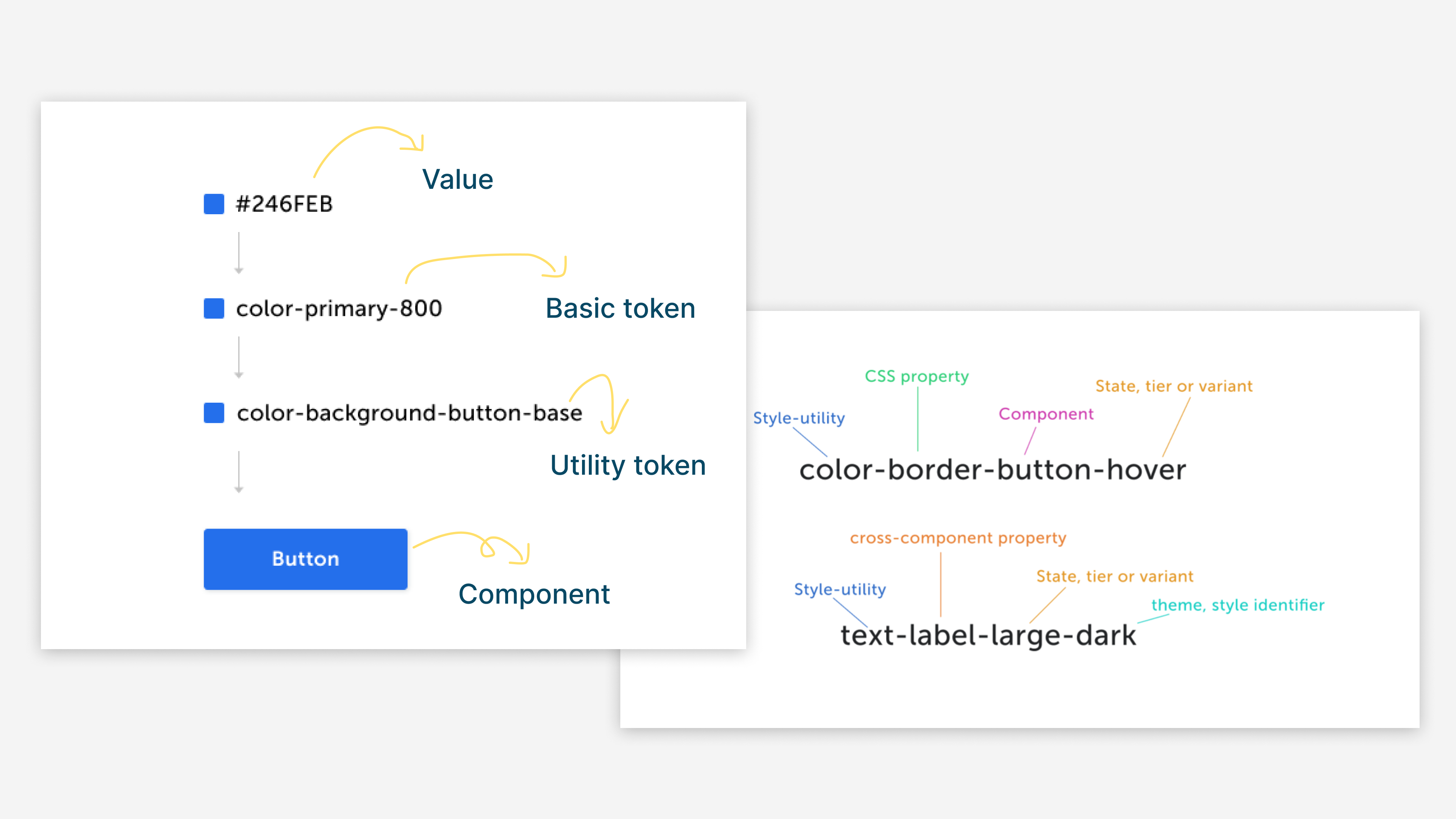
Instead of spending hours refining individual buttons, designers can invest more time in building systems that enable others to create consistent experiences.
As AI lowers the cost of generating interfaces, the value shifts toward defining the principles that generate them.
Becoming an AI-native designer
After spending the past few weeks rebuilding my workflow, I don't think becoming an AI-native designer is simply about learning new tools. It's about rethinking how we spend our time.
Less time maintaining files and producing repetitive work can mean more time understanding customers, collaborating with product managers and engineers, exploring possibilities, questioning assumptions, and making better design decisions.
AI hasn't made designers less important. If anything, it has highlighted the parts of our work that are hardest to automate: judgment, systems thinking, communication, and understanding people.
Those are still deeply human skills.
Perhaps the biggest lesson I've learned so far is this:
AI accelerates implementation. Experience guides judgment.
And in a world where almost anyone can generate an interface, I believe good design decisions become one of the most valuable things a product designer can contribute.
