Gretel Navigator - Designing an Intent-First Generative AI Experience
Turning synthetic data generation from a technical, configuration-heavy process into an interactive experience driven by user intent.

Intro
Gretel Navigator was a generative AI playground for creating and augmenting tabular data through natural language.
The project began at a time when many of today’s generative AI interaction patterns were still emerging. Rather than optimizing an established workflow, we were defining a new one: how could users direct a complex synthetic data model without first having to understand how the technology worked?
Looking back, this became my first real experience designing around user intent rather than system configuration.
Instead of asking users to configure the AI, we started by asking: What are you trying to create?
The problem - Powerful technology behind a black box
Traditionally, generating synthetic data in Gretel required users to understand the underlying system. They needed to select an appropriate model, configure it, often through a technical configuration file and then run a larger generation job before seeing the final result.
This created a disconnected experience:

There was little opportunity to experiment with the model, preview its direction, or refine the result before committing to a full generation job.
For customers, that created both usability and practical costs. If the generated data wasn't what they expected, they might have already spent significant time and credits producing something they couldn't use.
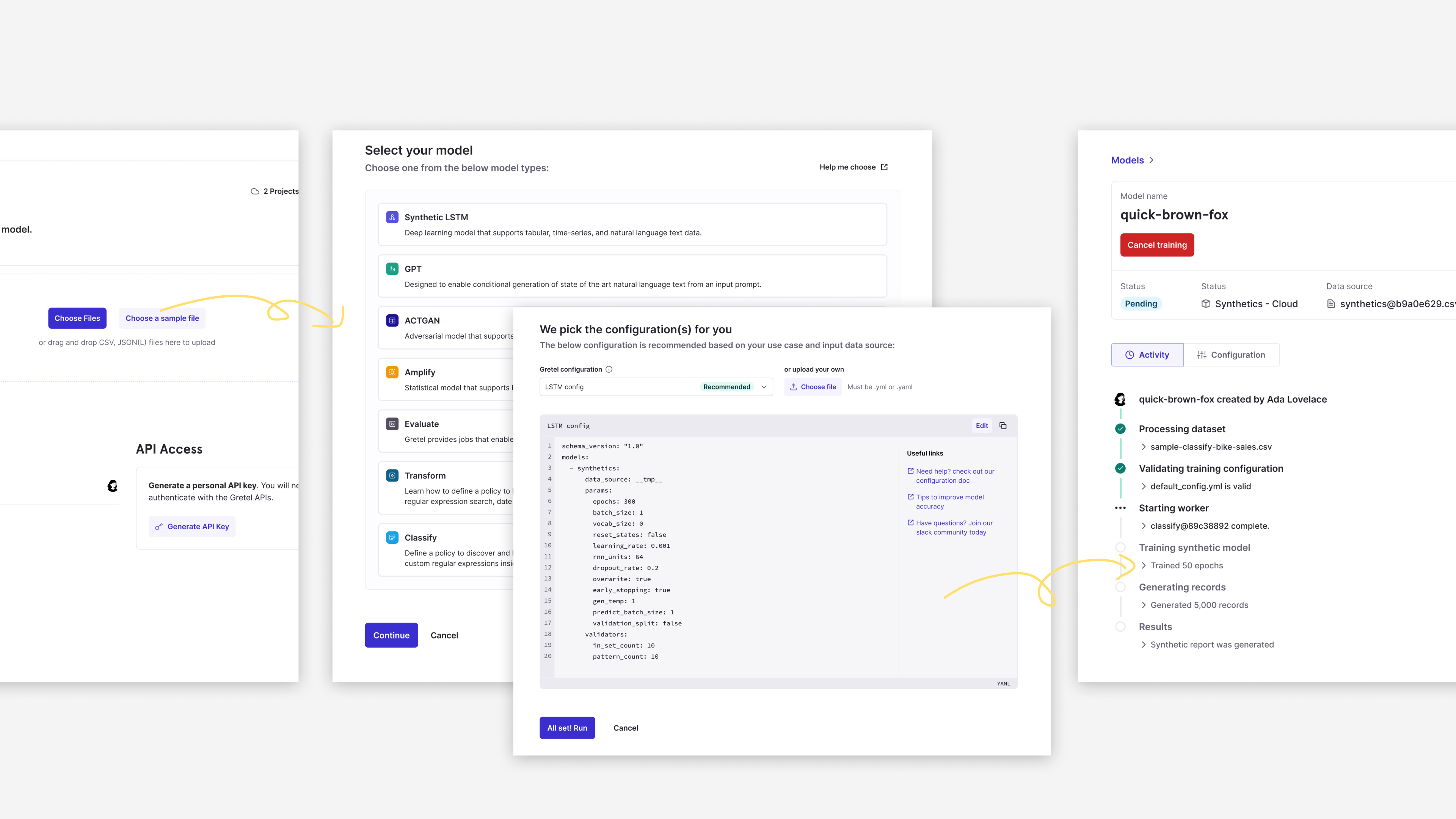
Limitations of the Process:
- Lack of visibility: Users couldn't evaluate the accuracy of their configuration settings before training the model.
- Data dependency: The process required users to have existing real-world datasets.
- Rigid process: The workflow was linear and waterfall-like. Users couldn’t make changes mid-process; they had to start over.
- High learning curve: Users needed a strong understanding of data science concepts to configure training settings correctly.
What if we started with the outcome instead?
Navigator reversed that relationship.
Rather than requiring users to understand the model first, they could simply describe the synthetic data they wanted in natural language.
The model would generate a sample immediately, allowing users to inspect the result, adjust their direction, and continue iterating before generating at scale.

This wasn't simply a new interface for the existing workflow. It changed the relationship between the user and the model from configuration to conversation and iteration.
Prompt-first shouldn't mean prompt-only
Natural language made the technology much more approachable, but it introduced a new UX problem.
An empty prompt offers almost unlimited freedom. But if users don't understand what the model is capable of, how are they supposed to know what to ask for?
I didn't want Navigator to require users to become good prompt engineers before they could get value from the product.
So the design challenge became broader: How can the interface help users discover, shape, and express what they want? We explored several complementary ways of answering that question.
01. Help users discover what's possible
Instead of leaving users with an empty prompt, we introduced examples based on realistic use cases. For example: “Generate positive and negative reviews for common household products purchased online. Columns are: product name, number of stars (1–5), review, and customer ID.” Selecting an example populated the actual prompt rather than triggering a hidden instruction.
That was deliberate.
The examples worked as both starting points and lightweight education. Users could see how an effective instruction was structured, understand the level of detail the model could accept, modify the prompt, and gradually learn how to express their own requests.
The interface wasn't writing the intent for them, it was helping them get started.

02. Let users show the AI what they mean
Prompting wasn't the only way users could communicate intent. We also gave users the option to bring their own dataset into Navigator.
An existing table contains context that can be difficult and tedious to describe through language alone: column structure, data types, relationships, time-series patterns, correlations, and examples of what real records look like.
Instead of forcing users to translate all of that into a prompt, the dataset could provide that context directly. The user didn't always need to tell the AI what they meant. Sometimes they could simply show it.
03. Let users shape the result directly
We also enabled direct interaction with the data itself. Users could remove rows or columns, rename fields, add information, or modify individual values to demonstrate how they wanted the resulting synthetic data to change.


This created multiple ways of expressing the same underlying intent:
Tell it. Describe the desired outcome through natural language.
Show it. Provide existing data as context.
Shape it. Directly manipulate the data and results to demonstrate what should change.
This became one of my most important takeaways from the project: Designing an AI experience isn't necessarily about designing the perfect prompt box. It's about designing effective ways for people to communicate what they actually want.
Designing when the behavior didn't exist yet
Navigator introduced another challenge: there wasn't an established workflow we could simply observe and optimize.
Customers were still learning what generative AI could do, while product, engineering, and data science each had their own assumptions about how people might use it. What can the technology realistically do? What are customers actually trying to accomplish?
To keep those perspectives from turning directly into features, I introduced an assumption tracker. Ideas were documented as hypotheses rather than requirements, giving us something explicit to prototype, discuss with customers, and revise as we learned. That distinction became especially important when one of our most reasonable assumptions turned out to be wrong.

When technical possibility didn't equal customer value
One of our early assumptions was that filling in missing data would be a highly valuable use case. Technically, the idea made sense. Real-world datasets can contain missing values, and generative AI could potentially infer and generate appropriate replacements.
The idea became prominent in our early prototypes. At one point, we even explored making “Fill in missing data” a primary suggested action. But deeper customer research exposed a problem.

Navigator could only display a small sample from what might be a massive dataset, typically a limited number of representative records. In many real-world scenarios, those particular records contained no missing values at all.
The capability was valid. The context wasn't. Something being technically possible doesn't automatically make it the right product experience. Instead of abandoning suggested actions, we changed our approach. We researched more realistic customer scenarios and developed examples that were industry-relevant while remaining broad enough to help different users discover what they could do. And “Fill in missing data” didn't disappear entirely. We made it contextual: when missing values were actually detected in the data being displayed, the suggestion became relevant again. The shift was subtle but important. We moved from asking: “What can our AI do?” toward: “What could be useful for this user, with this data, right now?”
From a black box to an iterative relationship
Together, these decisions created a fundamentally different relationship between users and Gretel's models.
Users could explore the model's behavior and understand whether it was moving in the right direction before committing credits to a larger generation job. The result wasn't simply a friendlier layer over complex technology. It created an interactive feedback loop between human intent and AI execution.

Looking back: My first intent-assisted design problem
When I designed Navigator, I wasn't calling any of this Intent-Assisted Design. That's a way of thinking I've developed much more recently. But looking back, I can see that the central question was already there: If AI can execute what someone asks for, what should the interface do to help them figure out what to ask for in the first place? Navigator taught me that an empty prompt isn't always enough.
People may need examples to discover what's possible. Existing data can communicate context more effectively than words. Direct manipulation can sometimes express an idea more clearly than prompting. And the interface itself can use context to surface relevant possibilities.
That experience has continued to shape how I think about AI products today:
Help people discover intent.
Help them shape it.
Give them multiple ways to express it.
Let AI accelerate the execution.
As AI makes execution increasingly inexpensive, I believe these decisions become more important, not less.
Someone still needs to understand the customer, recognize when a technically impressive capability isn't actually useful, determine where freedom helps and where guidance is needed, and ultimately decide what is worth building.
In retrospect, Navigator wasn't only my first generative AI product. It was my first real experience designing around intent rather than features and the beginning of a line of thinking I'm still developing today.
